
2 min read
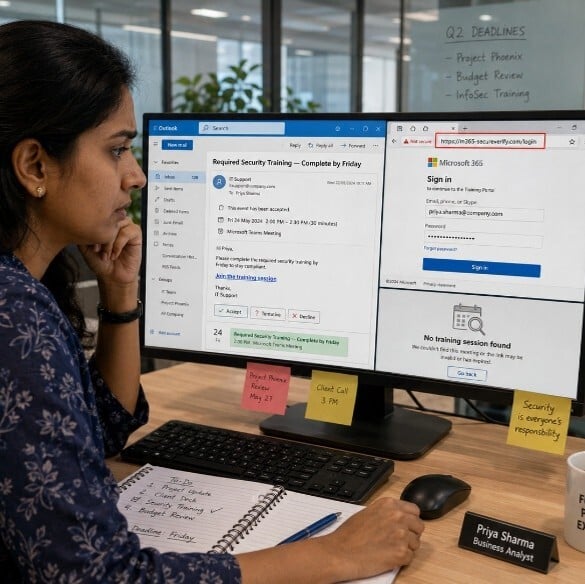
Priya had a full inbox and three deadlines by noon. When a calendar invite arrived from "IT Support," she barely paused. The subject said: Required Security Training - Complete by Friday. It came with a link to join a "brief online session."
She clicked Accept and followed the link. The page looked professional. It asked her to sign in with her Microsoft 365 credentials to access the training portal. She typed her email and password without thinking twice.
There was no training. There was no meeting. By the time Priya realized something was wrong, her account credentials had already been captured.
What Happened
Attackers sent a fake calendar invite designed to look like an internal IT request. The invite included a link to a phishing page that mimicked a real login screen. Priya entered her credentials on a site she did not verify. The attackers collected them instantly.
Calendar invites feel routine. That is exactly why attackers use them. A captured work login can give someone access to your email, files, Teams messages, and shared documents. It can also be used to attack your coworkers. At home, if you reuse that password on personal accounts, those are now at risk too.
Remember the Framework

Simple Steps to Protect Yourself
-
Check who sent the invite. An internal meeting from IT should come from a verified company email address, not a random external address.
-
Be suspicious of any invite that includes a login link. Legitimate internal training and meetings do not ask you to re-enter your credentials.
-
Hover over any link before clicking. If the address looks unfamiliar or does not match your organization's domain, do not click.
-
At home, apply the same habit. Fake event invites also arrive through personal Gmail and iCloud calendars, often tied to shopping or delivery scams.
-
If an invite feels unexpected or urgent, contact the sender directly through a known channel, such as Teams or a work phone number, to confirm it is real.
Do This Today
✔ Open your calendar right now and look for any invite you accepted without verifying the sender. If any include an external login link, do not click it. Report it to IT.
Quick Checklist
-
I check the sender's email address before accepting a calendar invite.
-
I do not click login links inside calendar invites without verifying first.
-
I contact IT directly if I receive an unexpected invite claiming to be from them.
-
I report suspicious invites instead of ignoring or deleting them.
-
I apply the same caution to invites that arrive in my personal calendar.
Zero Trust Human Habit of the Week
Before you click any link inside a calendar invite, ask one question: Did I expect this, and do I recognize the sender?