
2 min read
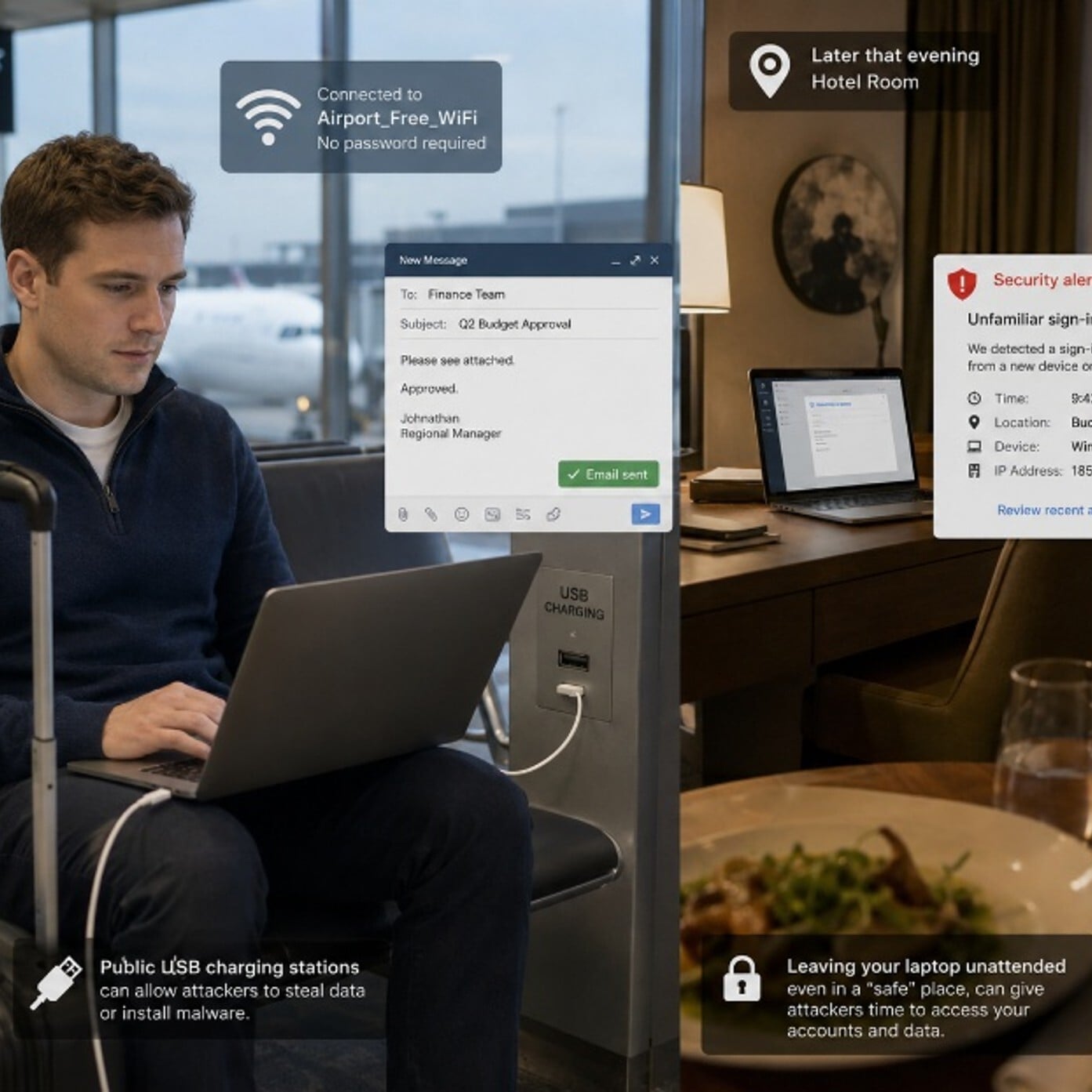
Johnathan had been looking forward to this trip for months. A client visit, two nights in a decent hotel and a direct flight home. At the airport, he settled into a chair near the gate, plugged his laptop into a public USB charging port and connected to the free Wi-Fi. He needed to review a proposal before landing. It seemed like the obvious thing to do.
At the hotel that evening, he used the in-room Wi-Fi to check his email and approve a few documents. He left his laptop on the desk when he went to dinner. He figured a locked room was safe enough.
By the time Johnathan landed home, someone had accessed his email account from an unfamiliar location. He never saw it coming, because nothing felt wrong in the moment.
What Happened
Public Wi-Fi networks at airports, hotels and coffee shops are rarely secure. Anyone on the same network can potentially intercept unencrypted traffic. Public USB charging ports can also be compromised to steal data from connected devices, a technique known as "juice jacking." And a hotel room, while private, is not a secure workspace.
Your work email, cloud accounts and saved passwords travel with you. One unsecured connection can expose your credentials, your files and your organization's data. What happens on a work trip does not stay there. A compromised account follows you home.
Remember the Framework

Simple Steps to Protect Yourself
-
Use your phone's mobile hotspot instead of public Wi-Fi. It is more secure and easy to set up.
-
Bring your own USB charging cable and plug it into a wall outlet, not a public USB port.
-
Use your company VPN any time you connect to a network outside the office.
-
Lock your screen every time you step away from your device, even in a hotel room.
-
Avoid approving MFA prompts you did not trigger. If one arrives unexpectedly while traveling, contact IT immediately.
-
At home, review your recent account sign-ins after a work trip to catch anything unusual.
Do This Today
✔ Find the VPN app on your work device and confirm you know how to turn it on before your next trip.
✔ Check your Microsoft 365 recent sign-in history and look for any unfamiliar locations or devices.
✔ Pack a wall charger and your own USB cable so you never need a public charging port.
Quick Checklist
-
Use mobile hotspot or VPN instead of public Wi-Fi
-
Bring your own charger. Skip public USB ports.
-
Lock your screen every time you walk away
-
Never approve an MFA prompt you did not request
-
Review your account sign-ins when you return home
-
Report anything unusual to IT before it becomes a bigger problem
Zero Trust Human Habit of the Week
Before you connect on the road, ask yourself: would I be comfortable if someone could see everything I am doing right now? If the answer is no, use your hotspot or VPN first.